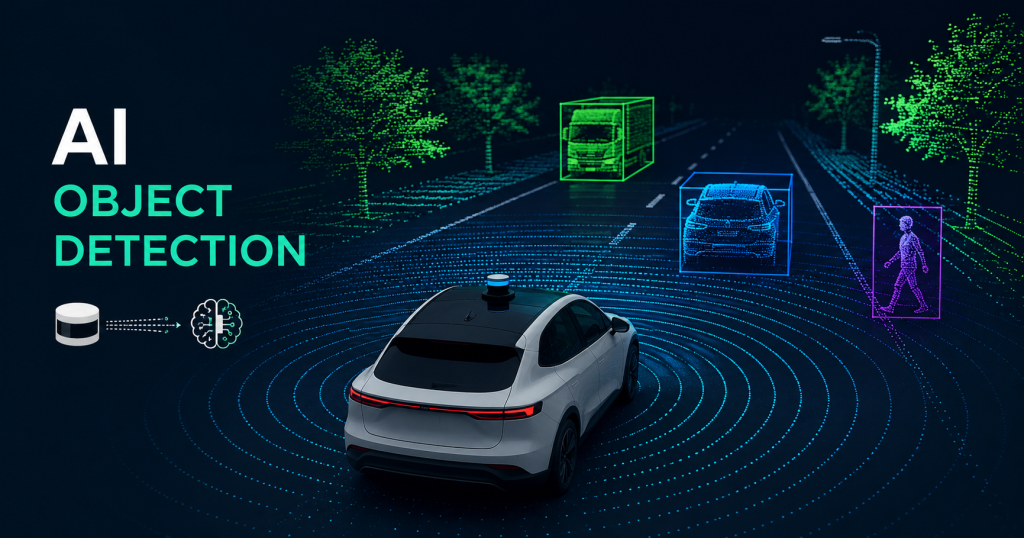
Imagine you are sitting in a self-driving car. There is no one holding the steering wheel. The car moves through busy streets, stops at red lights, avoids pedestrians, and parks perfectly — all by itself.
How does it do that?
The answer is LiDAR combined with Artificial Intelligence (AI). Together, they give the car a pair of “eyes” that can see better than any human in many situations.
In this article, we will explain — in simple words — how AI uses LiDAR to find and identify real-world objects like cars, people, trees, and road signs. We will also look at two famous AI algorithms called YOLO and PointNet, and show you how self-driving cars use all of this in real life.
Whether you are a student learning about AI or an engineer exploring autonomous systems, this guide is for you.
What Is LiDAR?
LiDAR stands for Light Detection And Ranging.
Think of it like a bat. A bat cannot see very well with its eyes, but it makes sounds and listens to the echoes. When the sound bounces back, the bat knows exactly where objects are. This is called echolocation.
LiDAR works the same way — but instead of sound, it uses laser light.
Here is how it works, step by step:
- A LiDAR sensor shoots thousands of tiny laser beams in all directions — up, down, left, right, and everywhere around the car.
- These laser beams travel until they hit something — a tree, a wall, another car, or a person.
- The laser beam bounces back to the sensor.
- The sensor measures how long it took for the light to come back.
- Since light always travels at the same speed, the sensor can calculate the exact distance to every object it hits.
LiDAR does this millions of times per second. The result is a 3D map made of millions of tiny dots. This map is called a point cloud.
A point cloud looks like a bunch of dots floating in space. Each dot has an X, Y, and Z position — meaning we know exactly where it is in three dimensions.
Simple Example: Imagine throwing confetti in a dark room. Every piece of confetti lands somewhere. Now imagine you can see every piece of confetti and know exactly where each one is. That is basically what a LiDAR point cloud looks like.
Related Article: What is LiDAR? A Simple Beginner’s Guide (2026)
Why LiDAR Is Better Than Just Cameras
You might wonder: “Why not just use a regular camera?”
Cameras are great. They capture color, texture, and details very well. But cameras have some big problems:
- Cameras struggle in low light. At night or in fog, cameras can miss important objects.
- Cameras are 2D. A camera photo is flat. It is hard to know exactly how far away something is.
- Cameras can be confused by shadows, bright sunlight, or unusual lighting.
LiDAR fixes most of these problems:
- LiDAR works in the dark because it creates its own light (lasers).
- LiDAR gives exact distances — not guesses.
- LiDAR creates a full 3D picture of the world.
- LiDAR works in rain and fog better than cameras.
That is why almost every self-driving car uses LiDAR. In fact, companies like Waymo (Google’s self-driving car project) use LiDAR sensors that shoot over 10 million laser pulses per second to build an incredibly detailed 3D map of the surroundings.
The Challenge: Turning Dots Into Understanding
Here is the big problem.
LiDAR gives us a point cloud — millions of tiny dots in 3D space. But dots alone are useless. The car does not just need to know where things are. It needs to know what those things are.
Is that a cluster of dots a person? A dog? A parked car? A trash can?
This is where Artificial Intelligence comes in.
AI neural networks are trained to look at these millions of dots and say: “That group of dots in that shape — that is a human being walking across the road. We need to stop.”
This process is called object detection.
How Neural Networks Learn to Identify Objects
A neural network is an AI system that learns by looking at many, many examples — just like how a child learns.
If you show a child 1,000 pictures of dogs and say “this is a dog” each time, the child learns what a dog looks like. Next time they see a dog, they recognize it.
Neural networks learn the same way, but with point cloud data instead of pictures.
Here is the training process:
- Collect data: Engineers collect millions of LiDAR scans from real streets.
- Label the data: Humans look at the scans and label each object. “This cluster of dots is a car.” “This cluster is a pedestrian.”
- Train the network: The AI studies all this labeled data over and over again. It looks for patterns — what shape is a car? What shape is a person walking? What shape is a bicycle?
- Test the network: The AI is tested on new data it has never seen before. Did it identify the objects correctly?
- Improve and repeat: Engineers fix mistakes and train again until the AI is very accurate.
After training, the neural network can look at a brand new LiDAR scan it has never seen before and correctly identify the objects in it — in real time, within milliseconds.
YOLO: You Only Look Once
One of the most famous AI object detection algorithms is called YOLO, which stands for You Only Look Once.
The Problem YOLO Solved
Before YOLO, object detection algorithms were slow. They worked in two steps:
- First, find areas in the image that might contain objects.
- Then, classify what is in those areas.
This two-step process was accurate but very slow — too slow for a car driving at 60 mph.
How YOLO Works
YOLO changed everything by doing both steps at the same time — in just one pass.
Imagine you take a photo and divide it into a grid, like a chessboard. Each square of the grid looks at that section of the image and asks two questions at the same time:
- Is there an object here?
- If yes, what kind of object is it?
Every square gives its answer simultaneously. The result is extremely fast detection — fast enough to run in real time.
Here is a simple breakdown of YOLO’s steps:
- Divide the image (or LiDAR scan) into a grid.
- Each grid cell predicts: location of objects (called bounding boxes), confidence score (how sure is it?), and class label (car, person, tree, etc.).
- Remove duplicate detections using a process called Non-Maximum Suppression — this makes sure one object is counted once, not multiple times.
- Output the final list of detected objects with their locations.
YOLO and LiDAR Together
Originally, YOLO was designed for 2D camera images. But researchers found clever ways to use it with LiDAR data too.
One common approach is to convert the 3D point cloud into a 2D “bird’s eye view” image — like looking at the scene from above. Then YOLO can be applied to this 2D representation just like it would be applied to a regular camera photo.
Another approach converts the point cloud into a range image — like a panoramic photo where each pixel stores the distance measurement instead of a color.
Both methods allow YOLO’s fast detection to work with LiDAR data.
Why Engineers Love YOLO
- Speed: YOLO can process images at over 45 frames per second. That means the car gets updated information about its surroundings 45 times every second.
- Accuracy: Modern versions of YOLO (like YOLOv8 and YOLOv9) are highly accurate.
- Simplicity: One single neural network does the whole job.
PointNet: AI That Understands 3D Points Directly
YOLO is great, but it works best with 2D images. Converting a 3D point cloud into a 2D image throws away some information.
This is where PointNet comes in. PointNet was created by researchers at Stanford University, and it was a revolutionary idea — it works directly with 3D point clouds, without converting them to images first.
The Challenge of Point Clouds
Point clouds are tricky for AI because:
- The points are unordered — there is no first point or last point. You could shuffle all the points and the scene would look the same.
- The number of points can vary — one scan might have 50,000 points, another might have 120,000.
- The points have no grid structure — unlike an image where pixels are arranged neatly in rows and columns.
Traditional AI networks (designed for images) cannot handle these properties.
How PointNet Works
PointNet solves these problems with a clever design:
- Each point is processed independently first. The network looks at each 3D point one at a time and extracts features from it — just based on its X, Y, Z coordinates.
- A “symmetric function” combines all points. After processing each point individually, PointNet uses a mathematical operation called max pooling to combine all the information. Max pooling picks the strongest signal from all points — this means the result is the same no matter what order the points are in. The unordered problem is solved!
- A global feature is created. From all those individual points, PointNet creates one single “global feature” that represents the entire object or scene.
- Classification and segmentation. Using this global feature, the network can:
- Classify the whole object (is this a car? a pedestrian? a tree?)
- Segment individual points (this point belongs to the car door, that point belongs to the windshield)
PointNet++ — The Improved Version
PointNet++ is an upgraded version that also looks at local neighborhoods of points — not just individual points. This helps it understand finer details and works better with complex shapes.
Why Engineers Use PointNet
- It works natively in 3D — no information is lost by converting to 2D.
- It is very robust — it works even if some points are missing or if there is noise in the data.
- It can do both classification (what is this object?) and segmentation (which part of the object is this?).
Real-World Example: How Waymo’s Self-Driving Car Uses All of This
Let us put it all together with a real example.
Waymo is one of the most advanced self-driving car companies in the world. Their cars drive real passengers in cities like San Francisco and Phoenix every day, without a human driver.
Here is what happens when a Waymo car is driving and a pedestrian starts to cross the road:
Step 1: LiDAR Scans the Scene
The car’s LiDAR sensor (sitting on top of the car) fires millions of laser pulses in 360 degrees. The pulses hit the pedestrian’s body and bounce back. In less than a second, the LiDAR has created a detailed 3D point cloud of the person — their height, width, and exact position.
Step 2: AI Processes the Point Cloud
The point cloud data is immediately sent to the car’s on-board computer. The AI system — running algorithms similar to PointNet or other 3D detection networks — analyzes the cluster of points.
The AI identifies the shape: two legs, a torso, arms, a head. It matches this shape to patterns it learned during training.
Result: “This is a human being.”
Step 3: Object Tracking
The AI does not just detect the person once. It keeps tracking them from frame to frame. It notices the pedestrian is moving — and in which direction. It predicts: “This person is walking toward the road. In 2 seconds, they will be in our lane.”
Step 4: Decision Making
The car’s planning system gets the information: “Pedestrian detected. Moving into our path. Confidence: 99.2%.”
The car decides to slow down and stop before reaching the pedestrian.
Step 5: Safe Outcome
The car stops safely. The pedestrian crosses. The car waits, then continues driving.
This entire process — from LiDAR scan to car stopping — happens in under 100 milliseconds. That is faster than a human blink.
Other Objects LiDAR AI Can Detect
Self-driving cars need to detect much more than just pedestrians. Here are the main object categories that LiDAR AI systems are trained to identify:
| Object Type | Why It Matters |
|---|---|
| Other vehicles (cars, trucks, buses) | Avoid collisions, follow traffic flow |
| Pedestrians | Most vulnerable road users — highest priority |
| Cyclists | Move unpredictably, need extra safety margin |
| Motorcyclists | Smaller and faster than cars |
| Trees and poles | Static obstacles to navigate around |
| Traffic cones | Indicate road construction zones |
| Animals | Unexpected, can run into the road |
| Road markings | Lane lines, crosswalks |
| Traffic signs | Stop signs, speed limits |
Each of these objects has a different shape and size in the point cloud. The AI learns the “signature” of each one during training.
The Numbers Behind LiDAR AI (Quick Facts)
Here are some impressive numbers that show how powerful this technology is:
- A typical LiDAR sensor generates 1–10 million points per second.
- Waymo’s cars have driven over 20 million miles of real-world autonomous driving.
- Modern AI detection systems can identify objects with over 95% accuracy in good conditions.
- Processing a single LiDAR frame takes less than 50 milliseconds on modern hardware.
- Self-driving cars typically use multiple sensors together — LiDAR + cameras + radar — for maximum safety.
Current Challenges in LiDAR Object Detection
LiDAR AI is amazing, but it is not perfect. Engineers are still working on these challenges:
1. Bad Weather Heavy rain, snow, and fog scatter laser beams. This makes the point cloud messy and harder to interpret.
2. Cost High-quality LiDAR sensors can cost thousands of dollars. This makes self-driving cars expensive. Companies are working hard to build cheaper sensors.
3. Edge Cases Unusual situations — a person in a wheelchair, a large dog, an oddly shaped vehicle — can confuse AI systems that were not trained on enough examples of those things.
4. Real-Time Processing Processing millions of points per second requires powerful — and power-hungry — computers. Making this more efficient is an active area of research.
5. Adversarial Attacks Researchers have shown that clever tricks (like placing special reflective tape on objects) can confuse LiDAR AI systems. Security is a growing concern.
The Future of LiDAR Object Detection AI
The field is moving very fast. Here is what is coming next:
- Solid-state LiDAR: No moving parts, cheaper and more reliable. Could bring the cost down from thousands to just hundreds of dollars.
- AI + LiDAR + Camera fusion: Combining the strengths of both sensors for even more accurate detection.
- Transformer models for 3D: The same AI architecture that powers ChatGPT is now being applied to 3D point clouds, with exciting results.
- Edge AI chips: Special computer chips designed specifically for processing LiDAR data quickly and efficiently on the vehicle itself.
Summary: The Full Picture
Let us recap everything we learned:
- LiDAR shoots laser beams and measures how long they take to bounce back, creating a 3D map of dots called a point cloud.
- AI neural networks are trained on millions of labeled examples to recognize patterns in point clouds — identifying objects like cars, people, and trees.
- YOLO is a fast AI algorithm that detects objects in a single pass, making it suitable for real-time use. It can be adapted for LiDAR data by converting point clouds into 2D images.
- PointNet is a smarter approach that works directly with 3D point clouds — no conversion needed — making it more accurate and preserving all the 3D information.
- Self-driving cars like Waymo’s combine LiDAR, AI detection, and object tracking to navigate safely in complex real-world traffic — making decisions in milliseconds.
Together, these technologies are making autonomous vehicles safer, smarter, and more reliable every day.
Read more Interesting and informational Blogs Visit Our Website Lidarmos
Final Thoughts
LiDAR object detection AI is one of the most exciting fields in technology today. It sits at the intersection of physics (how lasers work), mathematics (3D geometry), computer science (neural networks), and engineering (building real systems that work in the real world).
Whether you want to build self-driving cars, robotics systems, drones, or smart cities — understanding how LiDAR and AI work together is an incredibly valuable skill.
The dots on a screen are more than just dots. They are the eyes of the future.

Technology writer and researcher passionate about LiDAR, robotics, and AI systems. Through Lidarmos, I share in-depth guides and insights to make cutting-edge sensing technology accessible to everyone.